Best motorcycle apps for iPhone
Most motorcycle apps are navigators that also record. Roveri is the one built for the ride itself. You tap Start, put the phone away and ride. When you get back, the ride is waiting: a route painted by speed or climb, your moving time, top speed and total climb, the weather you rode through, and every record it set. Here are the six motorcycle apps riders most often weigh up, and what each one is for.
REVER, Calimoto, Scenic and Kurviger are good at telling you where to turn, and RideLog keeps the bike’s fuel and servicing log. If you know your roads, or you would rather find them by riding, the question is what an app gives you back afterwards. That is what this page compares. Roveri is ours; every fact about the other apps comes from their own pages, checked on 21 October 2026.
At a glance
| App | Built for | Records on the free tier | After the ride, you get |
|---|---|---|---|
| Roveri | Riding with the phone in your pocket | Yes | A route painted by speed or climb, moving time, top speed, climb, weather along the route, records |
| REVER | Riding with other people | Yes | Distance, duration, elevation and speed |
| Calimoto | Being guided to twisty roads | Paid (Premium) | Lean angle and acceleration analysis |
| Scenic | Planning a route, then following it | Yes | Location, speed, distance and rider statistics |
| Kurviger | Planning the curviest route | Paid (Tourer+) | Date, journey time, distance, average speed, maximum elevation |
| RideLog | The bike’s costs and servicing | — | Distance, route, speed, elevation and fuel |
A ”—” means the app’s own pages don’t say, not that the feature is missing. All six are free to download from the App Store; prices vary by region and change often, so check each listing.
Roveri: for riding, not for watching a screen
A navigator wants your eyes on the screen. Roveri wants nothing from you while you ride. One tap starts the ride, the phone goes in your pocket, and the ride sits on the Lock Screen and in the Dynamic Island, where you can pause and resume it without unlocking (press page).
The ride is where Roveri spends its effort, after you stop:
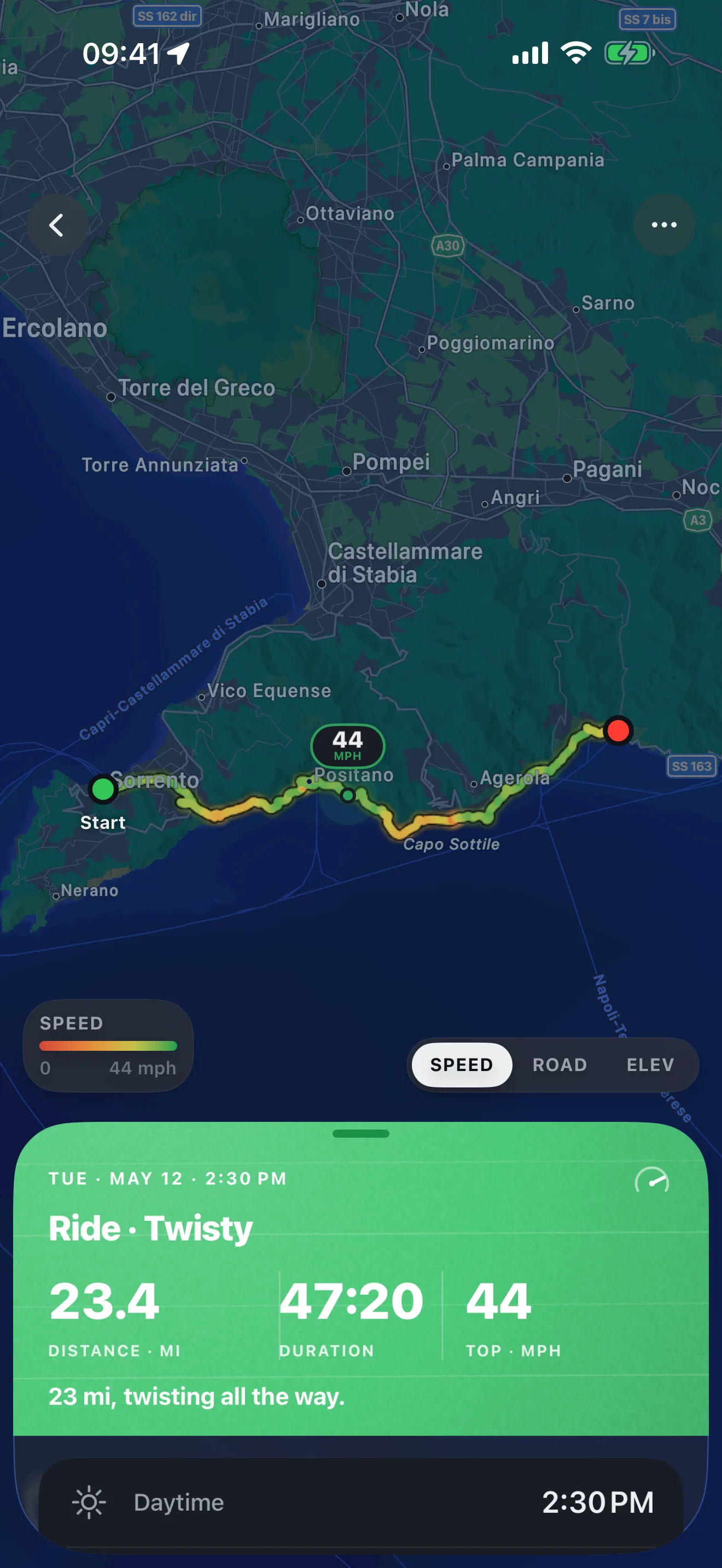
- The route, painted. The map colours your line by speed or by elevation, so you can see where you opened up and where the road climbed. An out-and-back draws as two lanes with arrows, not one line on top of another.
- The numbers that matter. Distance, moving time with stops left out, top speed and total climb, for every ride.
- The weather you actually rode in. Up to eight readings taken along the route, so a ride that started dry and ended in rain says so.
- Records and milestones. Your longest ride by distance and by time, your biggest climb, your first night ride and each distance total you pass, marked as they happen.
- Your season, over time. A monthly Rewind of the roads you rode, and with Roveri Pro the Coverage Atlas, every road you have ever ridden on one map that deepens with every pass.
Recording, your full history and each ride’s map and stats are free. Roveri Pro adds the Coverage Atlas, Where to ride (nearby places rated by the riding weather hour by hour), an elevation profile, the climate along your route and GPX export. Roveri doesn’t plan routes or give directions, by design, and it runs on iPhone (iOS 18.6 or later).
When you do want directions
Some rides need a navigator: a new country, a road you have never heard of, a group meeting at a pass. The first four are built for that, and each records too. RideLog, last, looks after the bike rather than the road.
REVER: for riding with other people
REVER calls itself “the world’s largest GPS app and community for motorcycle, snowmobile, and off-road enthusiasts” (App Store). Its free tier records rides with distance, duration, elevation and speed, and it carries the social layer: communities, challenges and friends on a live map (rever.co/pro). Turn-by-turn directions, offline maps and GPX export are in REVER PRO; GPX import is free. It is also on Android. Roveri vs REVER goes deeper, and Calimoto vs REVER puts the two navigators side by side.
Calimoto: for being guided to twisty roads
Calimoto is a navigation app built around curvy routes, with voice-guided turn-by-turn navigation and a riding community (App Store). Its tracker analyses lean angle and acceleration after a ride. Calimoto’s own Basic-versus-Premium table puts ride recording in Premium, along with turn-by-turn and GPX export; GPX import is in Basic (calimoto help centre). It runs on iPhone and Android (calimoto.com). Roveri vs Calimoto compares the two.
Scenic: for planning a route, then following it
Scenic is a route planner and navigator for riders. Its free tier records rides, tracking “your location, speed and distance”, and shows rider statistics, thousands of public routes and follow-the-line navigation. Turn-by-turn navigation, offline maps, elevation profiles and GPX import and export are in Scenic Premium (scenic.app/premium). It is also on Android.
Kurviger: for planning the curviest route
Kurviger is a planner for “the curviest motorcycle routes and … beautiful round trips” (App Store), with a web planner beside the app (kurviger.com). Ride recording and navigation are both in its Tourer+ tier; a recorded ride shows its date, journey time, distance, average speed and maximum elevation, and can be downloaded as a GPX file (Kurviger docs). It is also on Android. Calimoto vs Kurviger puts the two twisty-road planners side by side.
RideLog: for the bike’s costs and servicing
RideLog “automatically detects and logs every ride, capturing distance, route, speed, elevation changes, and fuel consumption” (App Store), and it also tracks refills, expenses and servicing reminders for more than one bike, with PDF or CSV export. It is free to download, with premium features behind a subscription or a one-time purchase (ridelog.it). It is on iPhone and Android. Roveri vs RideLog compares the two.
How to choose
Start with one question: do you need to be told where to turn?
- Usually not. You ride roads you know, or you find new ones by riding them. Then the navigator is weight you don’t need, and what matters is what you keep: Roveri.
- Yes, and you want twisty roads found for you: Calimoto or Kurviger, and budget for the paid tier, because both put recording there too.
- Yes, and you ride with a group: REVER.
- You mostly want fuel and servicing tracked: RideLog.
On the days you do need directions, use a navigator to get there and let Roveri keep the ride.
If you came here because Strava has no motorcycle type, see Is there a Strava for motorcycles?, and if you are moving off EatSleepRIDE, see EatSleepRIDE has shut down.
Common questions
What is the best motorcycle app for iPhone?
It depends on the job. To be guided along twisty roads, Calimoto or Kurviger; to ride with a group, REVER; to plan a route and follow it, Scenic. If you mostly ride roads you know and want to keep each ride, with its map, numbers and weather, Roveri is built for exactly that.
Which motorcycle app records rides for free on iPhone?
Roveri, REVER and Scenic all record rides on their free tiers. Roveri keeps the most per ride for free: the route painted by speed or climb, moving time, top speed, climb and the weather along the route. Calimoto and Kurviger put ride recording in their paid tiers.
Do you need a navigation app to record a motorcycle ride?
No. Recording a ride only needs GPS, and directions are a separate job. Roveri records without navigating at all: you tap Start, put the phone in your pocket and read the ride back when you stop.
Can you move your rides from one motorcycle app to another?
Usually, through a GPX file. Roveri opens a GPX file for free and exports one with Roveri Pro. REVER, Calimoto and Scenic export GPX on their paid tiers, and Kurviger exports a recorded ride as GPX.
Roveri runs on iPhone (iOS 18.6 or later) and is free to download, with an optional Pro tier. Read the code-verified fact sheet on the Roveri press page, or get Roveri on the App Store.