How do you record a motorcycle ride on iPhone?
To record a motorcycle ride on iPhone, start a ride in a riding app, ride, and stop it — the app saves the route, speed, and elevation, and some also capture the weather along the way.
Roveri records a ride in one tap on iPhone, keeps every ride on your device and in your own iCloud, and needs no account to record.
How recording a ride works
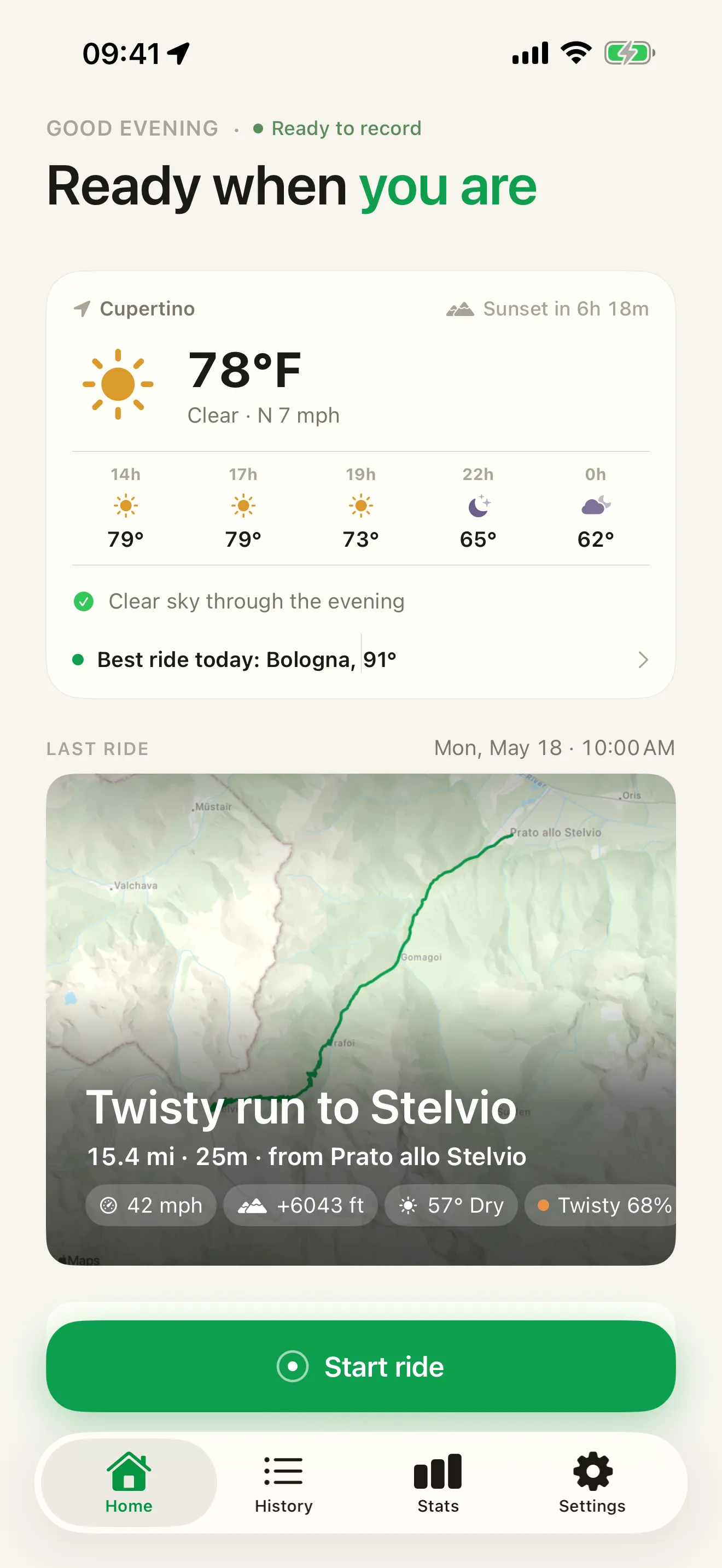
In Roveri you start a ride with one tap on the Home screen, put the phone away, and end it with one tap when you arrive. Start and stop are manual, so there is no automatic detection to second-guess and nothing to set up before your first ride.
While the ride runs, the app follows your iPhone’s GPS and records the route you took, your live speed, and the elevation you climbed and descended. While you ride, the active ride lives on the Lock Screen and in the Dynamic Island — you can pause and resume it without unlocking the phone. When you end the ride, Roveri adds up to eight weather samples taken along the route from Apple WeatherKit, so the ride remembers what the day was like — temperature and conditions, and where they changed.
| Lock Screen | Dynamic Island | |
|---|---|---|
| Pause | Yes | Yes |
| Resume | Yes | Yes |
| End | No | Yes |
Ending a ride is Dynamic Island only, so a stray tap on a locked screen cannot save a two-minute ride by accident.
Neither surface is Roveri’s invention — both are Apple’s, and a recorded ride is an ordinary Live Activity of the kind the iPhone User Guide describes:
“On supported models, you can check alerts and Live Activities—such as a Voice Memo recording in progress, an AirDrop connection, and directions from Maps—in the Dynamic Island on the Home Screen or in an active app whenever your iPhone is unlocked.”
Note where that sentence stops: the Dynamic Island, on an unlocked phone. Apple gives the Lock Screen its own page in the same guide, and the split is exactly why the table above has two columns — what a locked phone will let you do is a different question from what the Dynamic Island offers.
PAUSE WITHOUT UNLOCKING
Paused from the Lock Screen.
The ride card sits on your Lock Screen for the whole ride. A fuel stop is one tap on the card — pause there, resume there — and the phone never has to be unlocked.
How to pause a ride from the iPhone Lock Screen
- Start a ride in Roveri and lock your iPhone — the ride card stays on the Lock Screen.
- Tap the pause button on the card. The card flips to paused and moving time stops counting.
- Tap the resume button on the card when you set off again — the ride picks up where it left off.
Recording continues with the phone in your pocket or on a mount with the screen off, which is what makes “put it away and ride” possible at all. Apple states the cost of that on Roveri’s own App Store listing:
“This app may use your location even when it isn’t open, which can decrease device battery life.”
That is Apple’s wording, applied to every app that records location in the background, and it is the honest planning note for a long day: on a full day’s ride, power on the bike or a battery in the tank bag is the difference between a complete track and one that stops at four o’clock. The floor for any of it is published on the same listing — Apple gives Roveri’s requirement as iOS 18.6 or later — so the compatibility line at the end of this page is checkable against Apple’s copy of it, not just ours.
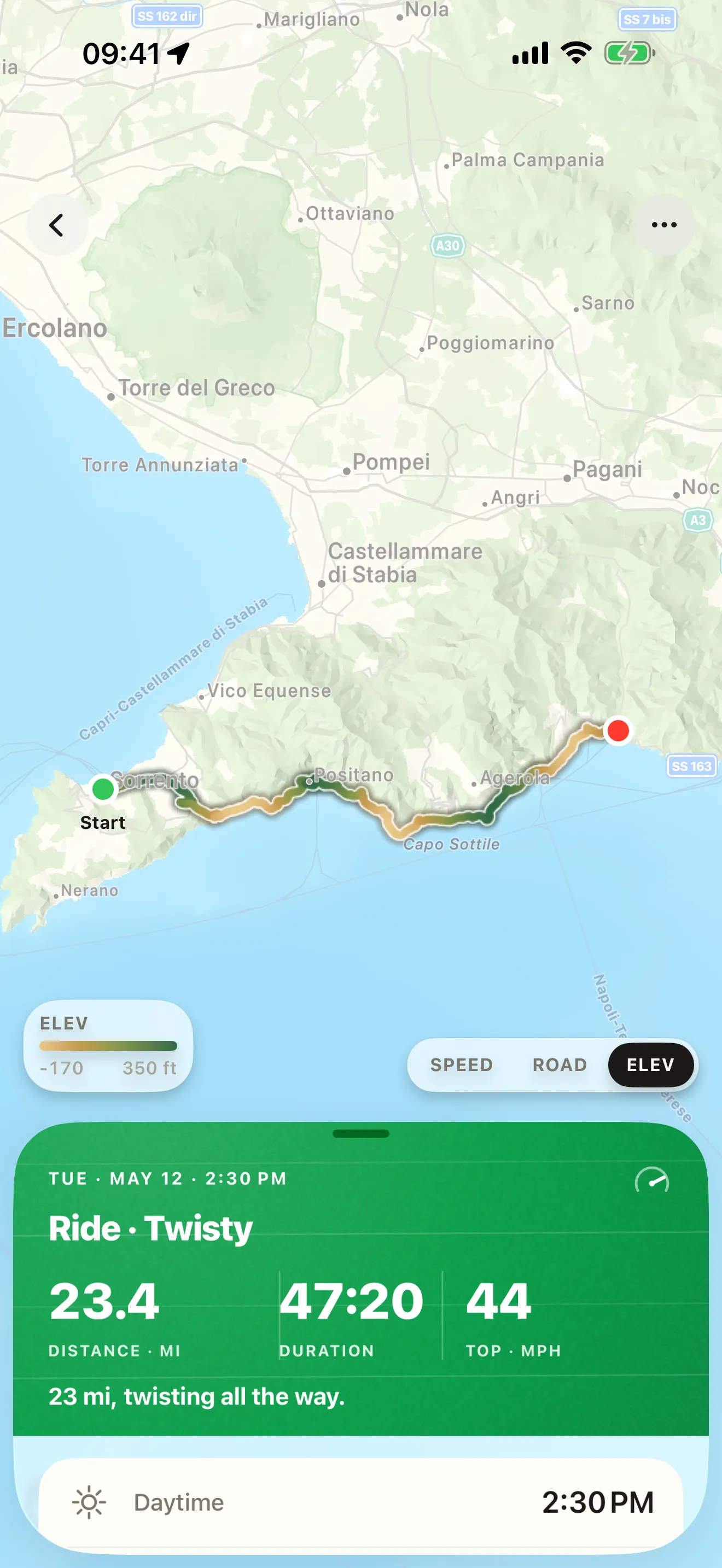
Each finished ride is saved as its own entry: the painted route on a map, the distance, the moving time, the top speed, and the total climb, with the weather attached. Paused time is left out of the moving total, and a pause draws no straight line across the map — the track is segmented, so a coffee stop reads as a stop rather than a jump across town.
RELIVE EVERY RIDE
Painted, and read back.
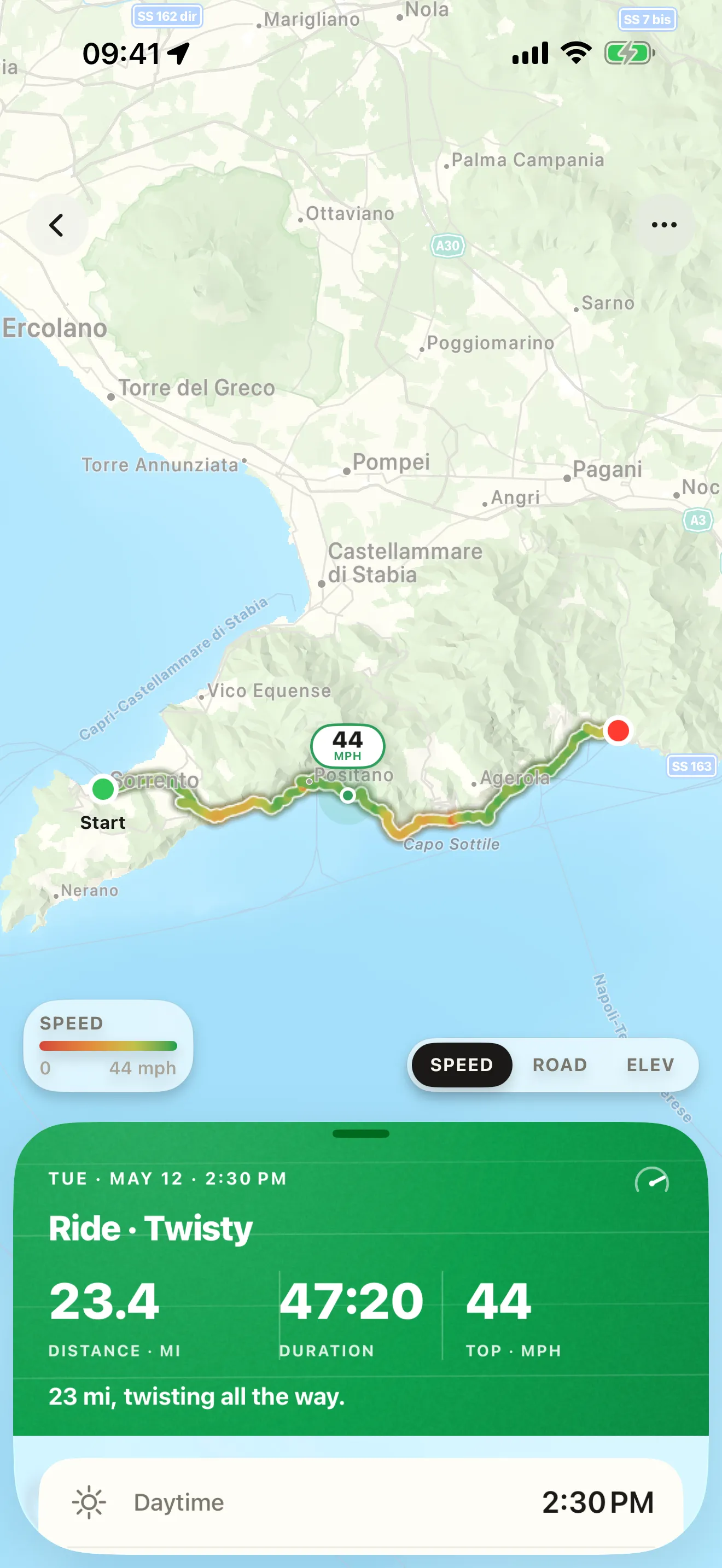
Open any saved ride and trace it painted by speed or by the elevation you climbed and descended, with the weather it was ridden in attached. The two views read the same ride two ways — where you were fast, and where the road climbed.
CLIMB, THEN SPEED
Every hairpin, painted.
A saved ride opens already painted — every stretch shaded by the climb and descent. Flip the view and the same road is coloured by how fast you rode it instead.
How to read a recorded ride back in Roveri
- Open any saved ride — the route comes painted by elevation.
- Switch to the speed view: the same road, coloured by how fast you rode it.
- Check the day's numbers — the weather you rode through is saved beside them.
EVERY RIDE, KEPT
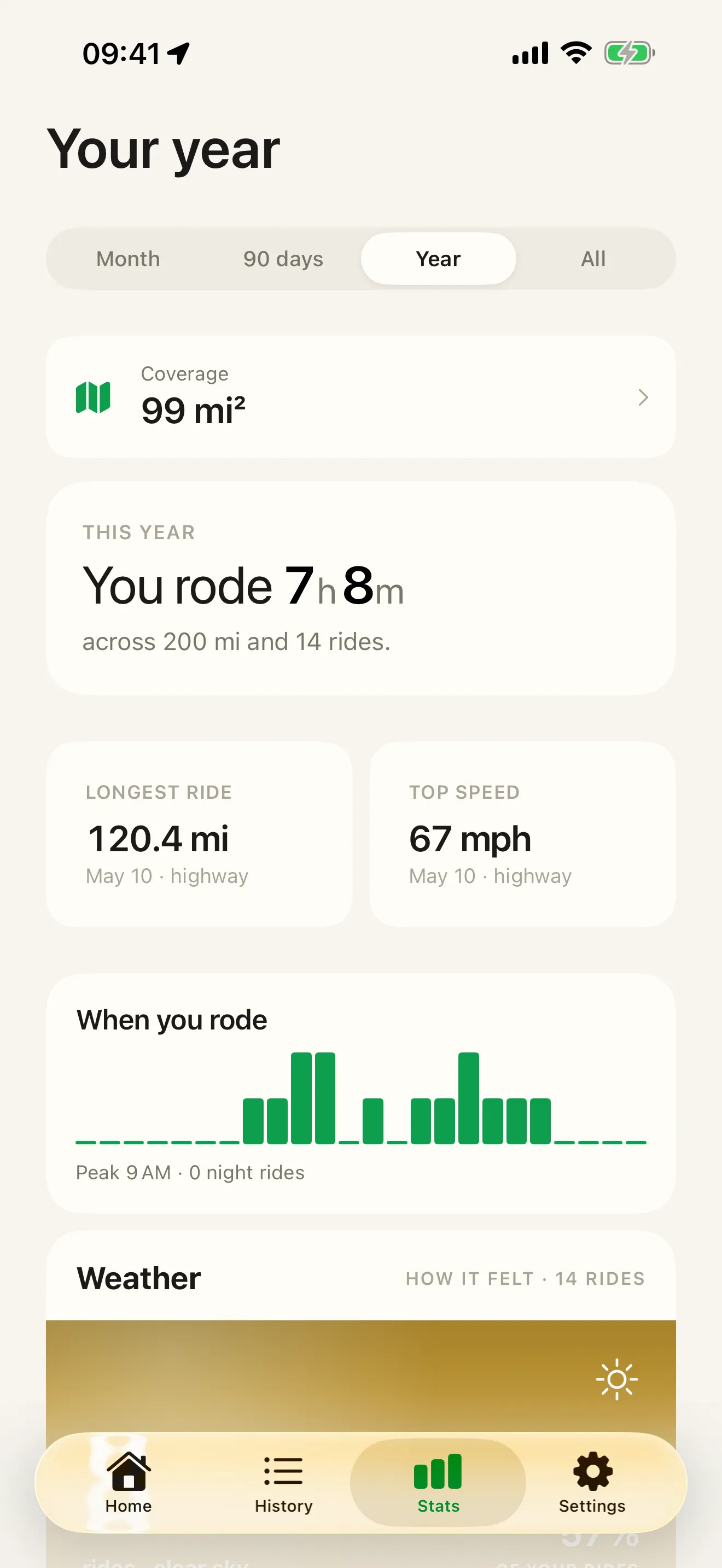
Every ride adds up over a season.
Recording rides is free, and so is your full history — every ride stays available with its map, per-ride stats, and weather, with no cap. Over a season the entries become the shape of your year: the records, the roads, and the weather you rode through.
- Distance, moving time, top speed, and total climb per ride
- Filter by route, weather, or time of day — and re-open any ride
What to look for in a riding journal app
Most apps that touch a motorcycle ride are built to plan or navigate a route. A journal is built for the other half of the trip — keeping the ride after you have taken it. A few things separate a journal you will still be glad to have in three years from one you abandon in a month:
- It records with almost no effort. One tap to start, one to stop. If logging a ride is a chore, you stop doing it, and a journal with gaps is not much of a journal.
- Your rides stay where you control them. The best home for years of your own history is your device and a cloud account you own, not a service that can change hands.
- You can get your rides out. Look for GPX export — the open, portable form of a recorded track. GPX export is a paid feature in most riding apps, Roveri included, so treat it as a Pro capability to check for, not a free given.
Common questions
Is there a free app to track motorcycle rides?
Yes. Roveri records rides free on iPhone, and your whole history stays available with its map, per-ride stats and weather, with no cap. Roveri Pro is optional: it adds the Coverage Atlas, the per-ride elevation profile, the climate measured along your route, GPX export, and Where to ride.
What is a motorcycle ride journal app?
A riding journal keeps the ride after you take it, rather than planning the route before. Each ride is saved as its own entry — route, distance, moving time, top speed, total climb, and the weather it was ridden in — so a season accumulates into something you can re-open.
Does recording a ride drain the iPhone battery?
It costs battery, and Apple says so on the listing itself: background location use can decrease device battery life. Plan a full day around it — power from the bike or a battery in the tank bag is the difference between a complete track and one that stops mid-afternoon.
Roveri is a riding journal for iPhone (iOS 18.6 or later), free to download with an optional Pro tier. Recording rides and your full history are free; Pro adds the Coverage Atlas (every road you have recorded, drawn as one map), a per-ride elevation profile, the climate measured along your route, GPX export, and Where to ride, which rates destinations near you by their hour-by-hour riding weather across a bundled dataset of 33,817 places. Read the full, code-verified fact sheet on the Roveri press page, or get Roveri on the App Store.