Calimoto vs Kurviger
Both are built to find you the curviest road. Calimoto is a navigator first; Kurviger is a route planner first. Calimoto plans a twisty route and talks you along it, then analyses your lean angle afterwards. Kurviger gives you detailed control over the route itself, and hands it to the app’s own navigation or to a Garmin or TomTom sat-nav.
On what you pay for, they are closer than they look. Calimoto keeps turn-by-turn, offline maps and ride recording in calimoto Premium; Kurviger keeps the same three in Tourer+. And if you mostly ride roads you already know, there is a third answer: you may not need a planner at all.
Side by side
| Calimoto | Kurviger | |
|---|---|---|
| Built around | Being guided along the curviest road, with lean-angle data afterwards | Planning the curviest route in detail, then riding it with Kurviger or a sat-nav |
| Planning the route | Twisty routing on the phone and on the website | Adjustable curviness, highways and tolls excluded, closures and unpaved roads flagged |
| Paid tiers | calimoto Premium | Kurviger Tourer (more planning tools, no ads) and Tourer+ |
| Voice-guided turn-by-turn | In calimoto Premium | In Kurviger Tourer+, with Apple CarPlay |
| Recording a ride | In calimoto Premium, even without navigating | In Kurviger Tourer+: date, journey time, distance, average speed, maximum elevation |
| After a ride | Lean-angle and acceleration figures for each trip | The recorded ride in the Kurviger Cloud, downloadable as a GPX file |
| Route files | GPX import is free; export is in Premium | Imports .gpx and .itn; transfers routes as .gpx, .itn or .kml, to a Garmin or TomTom too |
| Offline maps | In calimoto Premium | In Kurviger Tourer+ |
| Where it runs | iPhone, Android and the calimoto.com planner | iPhone, Android and the kurviger.com planner |
Calimoto facts come from its App Store listing and its own Basic-versus-Premium table, checked on 21 October 2026. Kurviger’s come from its App Store listing and its own knowledge base: Tourer and Tourer+, offline maps and ride recording, checked on 21 and 22 October 2026. Both apps’ home pages: calimoto.com and kurviger.com. We make Roveri, which appears further down.
Calimoto: when you want to be guided
Calimoto calls itself “the ultimate motorcycle navigation”. You plan a twisty route on the phone or on the website, and it talks you along it with voice directions. Its tracker analyses lean angle and acceleration after every trip.
Calimoto’s own comparison table puts most of that in Premium: turn-by-turn, offline maps, Group Rides, speed-camera alerts, GPX export and recording a ride. The free tier plans a trip and imports a GPX file. Pick Calimoto if you want one app that finds the road, guides you along it and analyses the ride afterwards.
Kurviger: when the plan is the point
Kurviger promises “the curviest motorcycle routes and … beautiful round trips”. The planner is where it goes deep: you set how curvy the route should be, keep it off highways or toll roads, see closures and unpaved stretches before you leave, and add biker meeting points, motorcycle hotels and fuel stops along the way. Routes live in the Kurviger Cloud, so a tour planned on kurviger.com opens on the phone.
Kurviger Tourer adds more planning tools and removes the ads. Tourer+ adds voice-guided navigation, offline maps and ride recording. If you ride with a dedicated sat-nav, Kurviger’s knowledge base walks you through sending a route to a Garmin or a TomTom. Pick Kurviger if you enjoy planning the tour as much as riding it.
How to choose between them
- You want the app to guide you and analyse the ride: Calimoto, on Premium.
- You want control over every stretch of the route: Kurviger; its paid Tourer tier adds the extra planning tools listed above.
- You navigate with a Garmin or a TomTom: Kurviger’s planner, sent to the device.
- You need turn-by-turn on the phone either way: both charge for it, so choose on the rest of the list above.
- You mostly ride roads you know: you may not need either. Read on.
OR NEITHER
Know your roads? Just ride.
A planner asks for the evening before; a navigator asks for your eyes on the screen. On the roads you ride every weekend, you need neither. What you lose instead is the ride itself: a month later, Sunday's loop is a blur. Roveri is built for that. Tap Start, put the phone in your pocket, and when you stop the ride is waiting: the route painted by speed or by climb, moving time with the stops left out, top speed, total climb, and up to eight weather readings taken along the way. Recording, your full history and each ride's map and stats are free.
- Pause and resume from the Lock Screen and the Dynamic Island, without unlocking
- Records and milestones: longest ride by distance and by time, biggest climb, first night ride, distance totals
- A monthly Rewind of the roads you rode, and with Roveri Pro the Coverage Atlas of every road you have ridden
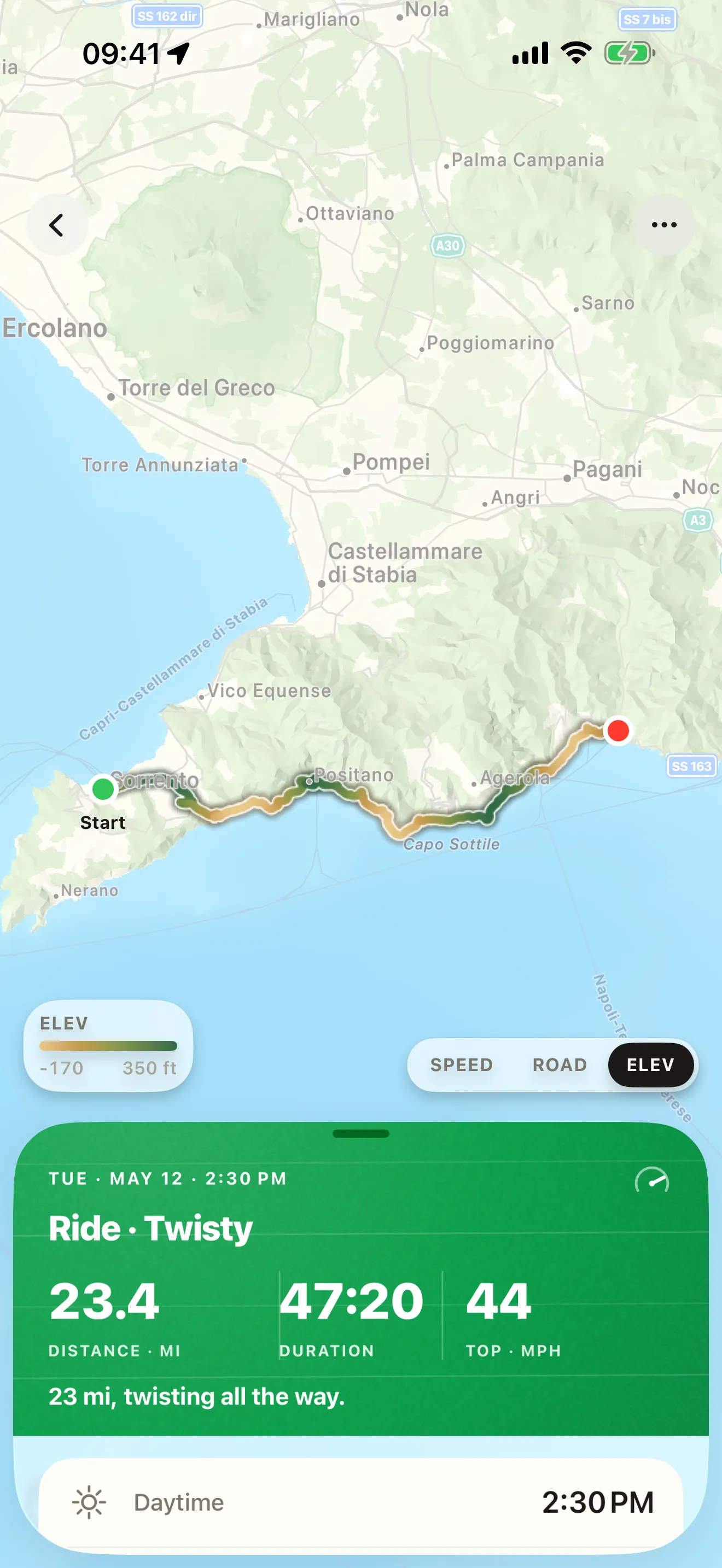

On the days you ride a new road, plan it in Calimoto or Kurviger and let Roveri keep the ride. Roveri doesn’t plan routes or give directions, by design, and it runs on iPhone only (iOS 18.6 or later). Already have rides in another app? A GPX file opens in Roveri for free.
For Calimoto against Roveri, see Roveri vs Calimoto; for the other big navigator, Calimoto vs REVER; and for six apps at once, the best motorcycle apps for iPhone.
Common questions
Is Calimoto or Kurviger better?
They lean different ways. Calimoto is better if you want one app to plan a twisty road, guide you along it and analyse your lean angle afterwards. Kurviger is better if you want detailed control over the route, round trips and stops, or want to send the route to a Garmin or TomTom sat-nav.
Do Calimoto and Kurviger have free turn-by-turn navigation?
No. Calimoto lists turn-by-turn voice directions in calimoto Premium, and Kurviger’s knowledge base says navigation is only available with a Kurviger Tourer+ subscription.
Which one records your rides, Calimoto or Kurviger?
Both, on their paid tier. Calimoto’s Basic-versus-Premium table lists ride recording under Premium, and Kurviger records rides with Tourer+, showing the date, journey time, distance, average speed and maximum elevation. Roveri records rides on its free tier, with the route painted by speed or climb and the weather along the way.
What is the difference between Kurviger Tourer and Tourer+?
Kurviger Tourer adds planning tools, such as avoiding current closures, setting the curviness per section and round trips up to 600 km, and removes the ads. Tourer+ includes all of that plus voice-guided navigation, offline maps and ride recording.
Roveri runs on iPhone (iOS 18.6 or later) and is free to download, with an optional Pro tier. Read the code-verified fact sheet on the Roveri press page, or get Roveri on the App Store.