EatSleepRIDE app shut down — what to use instead
EatSleepRIDE stopped its service on 27 September 2024, and its app is no longer on the App Store or Google Play. If you kept your rides as GPX files, they are not lost: open each one in Roveri on your iPhone and it comes back as a ride with its route on the map — free, with no account.
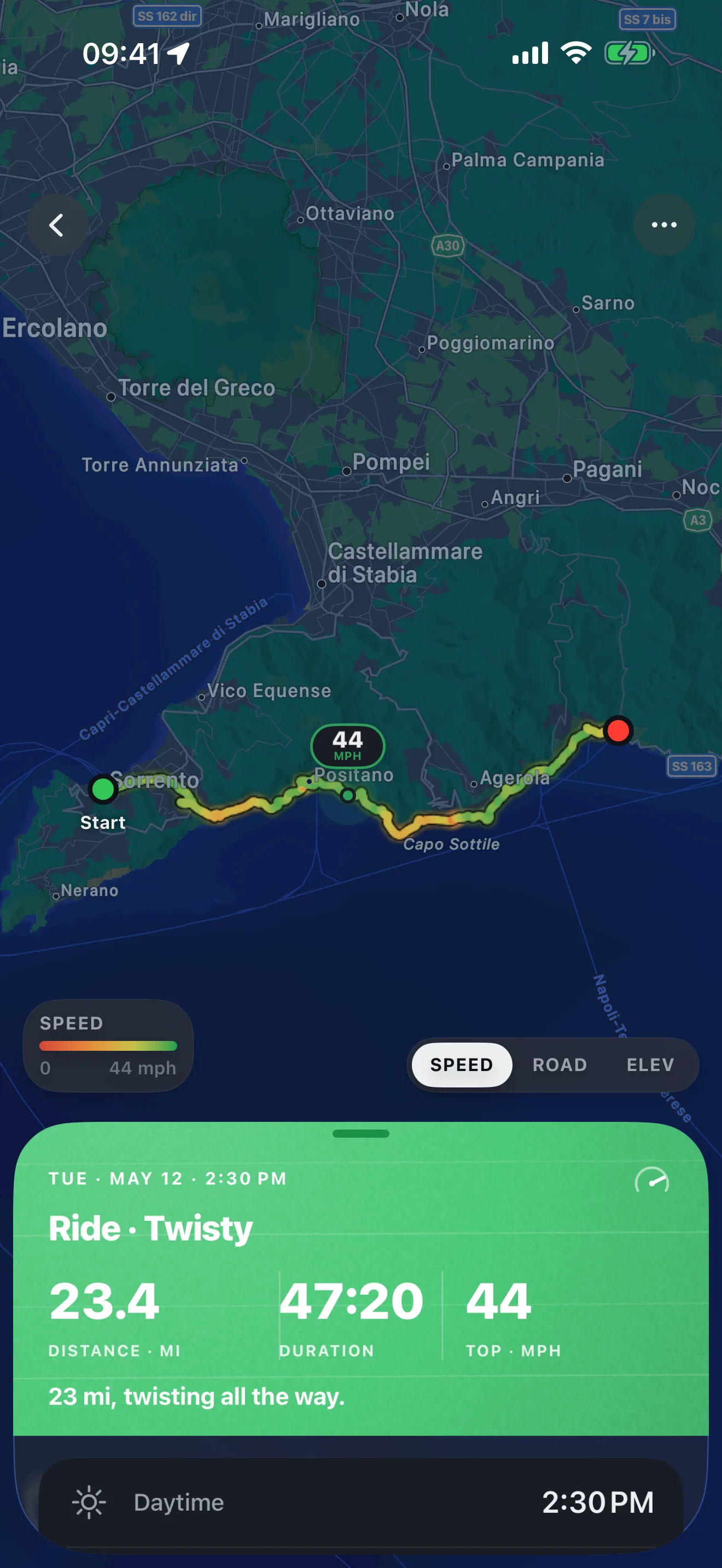
For the riding you do from here on, Roveri is the natural new home if what you loved was logging your rides. Tap Start, put the phone in your pocket and ride. When you get back, the ride is waiting: the route painted by speed or elevation, your moving time with the stops left out, top speed, total climb and the weather you rode through.
What happened to EatSleepRIDE
EatSleepRIDE’s CEO, Marina Mann, posted the notice herself: “As of this Friday, September 27th, 2024, we’ve decided to stop services.” The same post added, “This is not the end. Stay tuned for what’s next by joining the mailing list.” In a reply under the notice she explained that features needing ESR’s servers, such as login, would go down. You can read the message on the EatSleepRIDE site.
The eatsleepride.com website is still online, but the app is not: as of 22 October 2026, EatSleepRIDE is listed on neither the App Store nor Google Play, and no relaunch has been announced.
Can you still get your rides?
It depends on where a ride ended up. ESR’s own help centre described two kinds: a ride you recorded and kept was stored in the app on your phone, and a ride you published to the EatSleepRIDE platform became a public route that could be downloaded as a GPX file from the desktop website. That help centre is now offline, and anything that needed ESR’s servers stopped with the service.
So what you can recover is what you saved:
- GPX files you downloaded while the website still served them. These are the most portable thing you have — GPX is an open format, and any app that reads recorded tracks can open them.
- Rides still in the app, if an old install still opens on your phone. Look for any way to send or save them as a file before that phone is replaced or the app is deleted.
If you never saved a file and the app is gone from your phone, there is no longer an ESR service to ask. That is worth a minute of honesty with yourself, and it is the reason to choose your next app by what it gives back and where it keeps it.
Bring your EatSleepRIDE rides into Roveri
If you saved your rides as GPX files, Roveri opens them. Tap a .gpx file — in Files, in Mail, sent over AirDrop — and pick Roveri. The file is read on your iPhone, and the ride lands in History under its own Imported section, beside the rides you record yourself. The full walkthrough is in how to open a GPX file on iPhone.
What comes back depends on what the file carries:
- Always: the route drawn on the map, with its distance and its climb worked out from the track.
- If the file has real timestamps: the duration, average and top speed, and — for rides on or after 1 August 2021 — the weather of the day you rode it and the names of the places you passed.
- If the file is a bare line with no times: Roveri opens it as a route, with distance and climb, and leaves duration and speeds at zero rather than inventing them. ESR’s help centre said a published route had speed and elevation stripped, so a file downloaded that way may open as exactly this kind of route.
Imported rides are kept apart on purpose. Your totals, your records and your Coverage Atlas are drawn from the rides you record in Roveri, so an old archive reads as an archive rather than inflating this season’s numbers. An import is stored on the iPhone you opened it on and does not sync to your other devices, so keep the original files somewhere safe. Opening the same file twice does not give you two of the same ride, and opening GPX files is part of the free app.
Where to log your rides now
Why Roveri suits riders who loved logging
Plenty of riders never wanted a navigator. They know their roads, or they find new ones by riding, and what they liked about an app like ESR was simply having the ride afterwards. That is the one job Roveri is built for. It does not plan routes or give directions; it stays out of the way while you ride and gives the ride back when you stop.
Each ride is saved with its route painted by speed or elevation, distance, moving time with paused time left out, top speed and total climb, and the weather — up to eight readings taken along the route. Roveri marks your milestones as they come: your longest ride by distance, your longest by time, your biggest climb, your first night ride, and the distance totals you pass. Each month a Rewind story looks back at the riding you did, and with Pro the Coverage Atlas draws every road you have recorded as squares on one map that deepen with every repeat pass.
The rides you record live on your iPhone and in your own private iCloud, and recording needs no account. After ESR, that is a reasonable thing to check in any app you trust with years of riding.
Roveri runs on iPhone (iOS 18.6 or later) and is free to download, with an optional Pro tier. Recording, your full ride history, per-ride stats, milestones, the shareable ride card and opening GPX files are free; Pro adds the Coverage Atlas, Where to ride, per-ride depth such as an elevation profile and GPX export, and the rest of the monthly Rewind. The code-verified fact sheet is on the Roveri press page, or get Roveri on the App Store.
Common questions
When did EatSleepRIDE shut down?
EatSleepRIDE stopped its service on Friday, 27 September 2024, according to a notice from its CEO, Marina Mann. As of 22 October 2026 the app is not listed on the App Store or Google Play, and no relaunch has been announced.
Can I import my EatSleepRIDE rides into Roveri?
Yes, if you saved them as GPX files. Open each .gpx file on your iPhone and pick Roveri; the ride lands in the Imported section of History with its route, distance and climb, plus duration, speeds and the weather of the day where the file has real timestamps. Opening GPX files is free.
Will old EatSleepRIDE rides count toward my Roveri totals?
No. Imported rides sit in their own Imported section, and your totals, records and Coverage Atlas are drawn from the rides you record in Roveri. Your old rides stay readable as an archive without changing this season’s numbers.
Is Roveri a navigation app like the ones ESR riders moved to?
No. Roveri does not plan routes or give directions. It records the rides you take — one tap to start and one to end — and keeps each one with its route, moving time, top speed, climb and weather. If you want turn-by-turn directions, a navigator such as Calimoto or REVER does that job.